NEW v3.0.0

Twitch Ad Tab Muter: Watch Through Ads

Watch multiple Twitch streams seamlessly! When a video ad plays, your stream covers it so you never miss a second. Automatically switch to your next favorite stream, too, all while supporting your streamers.

Twitch Ad Muter Extension

Key Features

Our extension is designed to enhance your Twitch viewing experience while supporting your favorite streamers.

NEWShow Stream During Ads

Instead of just going quiet, your stream now covers the video ad, so you never miss a second of the action.

Automatic Ad Muting

Seamlessly mutes the tab during ads without disrupting the stream, ensuring streamers still receive ad revenue and viewer counts.

Independent Toggles

Customize your experience with independent toggles. Choose whether to mute the tab or leave it unmuted, and whether to show your stream during ads or not.

Multi-Tab Control

Rank your favorite streams and automatically switch to the highest-ranked stream without ads. Manage multiple streams effortlessly with smart audio routing.

What's New in v3.0

Keep Watching Through Every Ad

The extension no longer just goes quiet during ads — it keeps your stream on screen. The moment a video ad starts, your live stream covers it, so you never miss a second.

1. Ad Starts, Tab Mutes

Just like before, the tab mutes automatically the moment an ad begins.

2. Your Stream Covers It

Your live stream automatically covers the ad right on screen, so you keep watching without interruption.

3. Ad Ends, Back to Normal

Once the ad break wraps up, your stream returns to normal automatically — no clicks needed.

We also tightened up ad detection under the hood, so the very first ad on a fresh page load — or right after Twitch switches channels — gets caught more reliably than before.

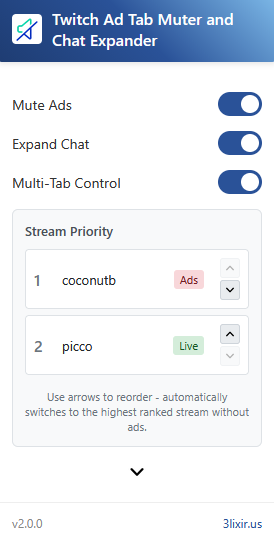
Watch Multiple Streams

How Multi-Tab Control Works

Watch multiple Twitch streams simultaneously and never miss your favorite moments. Our intelligent system automatically manages your viewing experience.

Multi-Tab Control Interface

Step by Step Guide

1
Open Multiple Streams

Open your favorite Twitch streams in separate tabs.

2
Enable Multi-Tab Control

Click the extension icon and toggle on "Multi-Tab Control".

3
Rank Your Streams

Organize streams by priority using drag-and-drop (Chrome) or arrow buttons (Firefox).

4
Automatic Switching

When ads play on your current stream, the extension automatically switches to your next highest-ranked stream without ads.

5
Enjoy Uninterrupted Viewing

Sit back and enjoy seamless viewing across all your favorite streamers!

Smart streaming experience

Why Choose Our Extension?

Our extension is packed with features that keep your viewing experience smooth and uninterrupted, all while supporting your favorite streamers.

  • Smart multi-stream management with priority ranking
  • Stream covers video ads so you never miss a second
  • Streamers still earn ad revenue
  • More reliable ad detection right after a page loads
  • Maintains viewer count for streamer analytics

Enhance Your Twitch Experience with v3.0

Watch multiple streams seamlessly, never miss your favorite moments, and support your content creators with our intelligent multi-stream management!

About 3lixir

We create innovative software solutions that enhance your online experience. Our mission is to build tools that make the digital world more enjoyable and user-friendly.